4 · Ask for review
What you will have done: marked a piece of work as needing a second pair of eyes, watched it stop short of Done, and approved somebody else’s.
The gate, in one picture
    sequenceDiagram
    participant W as Whoever did the work
    participant B as The board
    participant R as Somebody else
    W->>B: drag the card to Done
    B-->>W: Parked for review — a reviewer decides it now
    Note over B: the card sits in In review
    B->>R: it appears in their Review queue and on their bell
    alt approved
        R->>B: Approve
        B-->>W: the card is Done
    else changes wanted
        R->>B: Request changes, with a note
        B-->>W: back to In progress, the note added as a comment
    end
The rule that makes this worth having: the person who asked is never the person who decides. Not by convention, by refusal. Neither is an agent, ever.
The walkthrough
1. Mark the item
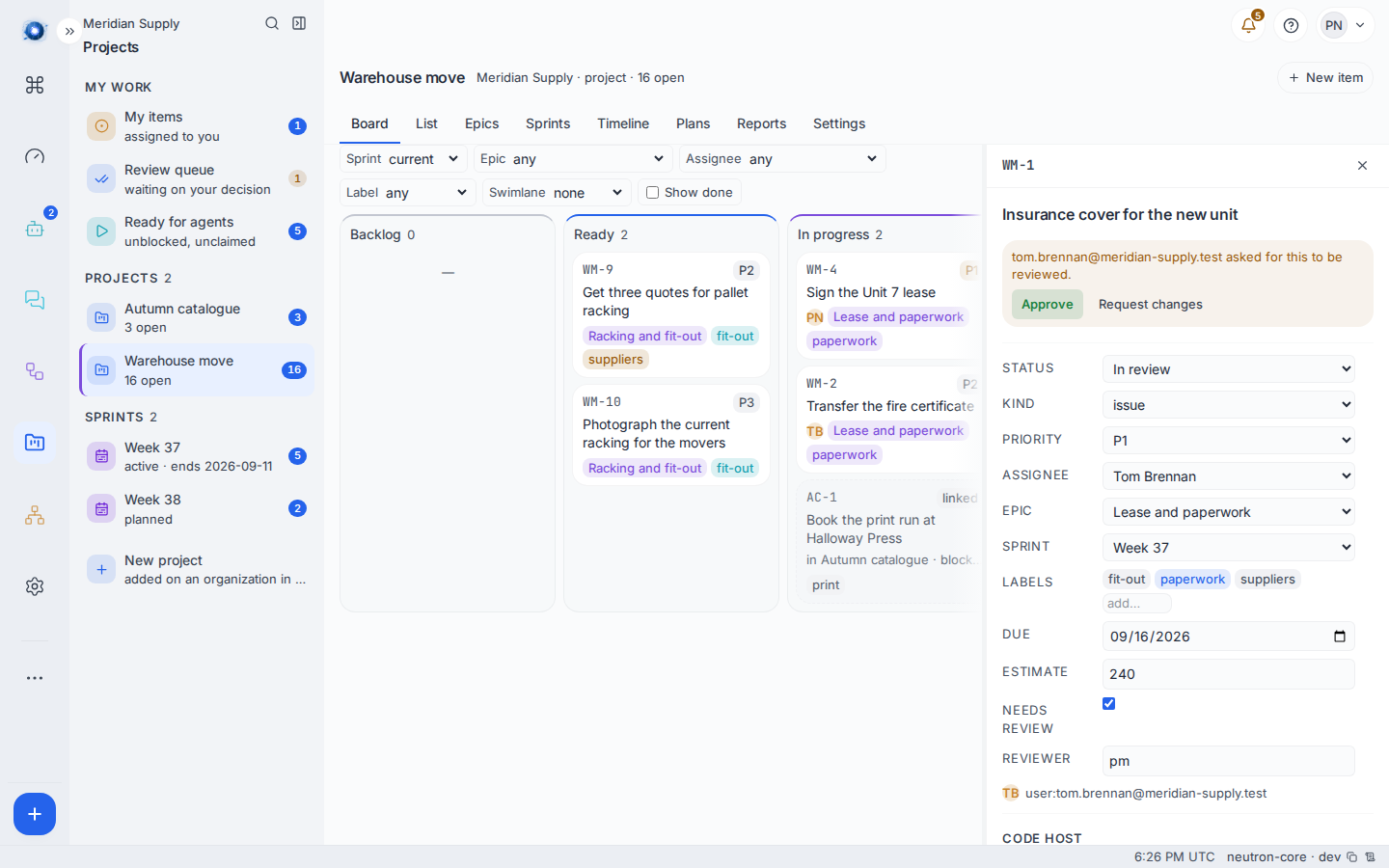
Open an item. In its fields there is Needs review. Tick it. Beside it, Reviewer names the role that has to decide; it is pm unless you change it.
Epics and milestones arrive with Needs review already on. Ordinary items, bugs and chores do not, so a task only asks for review when somebody says it should.
2. Finish the work and move it to Done
Drag the card to Done as usual. It does not land there. It stops in In review, and a strip appears above the board reading Parked for review — a reviewer decides it now. The card now carries a review · pm chip.
Nothing else about the card changes. It still has its assignee, its epic, its week.
3. The reviewer finds it in three places
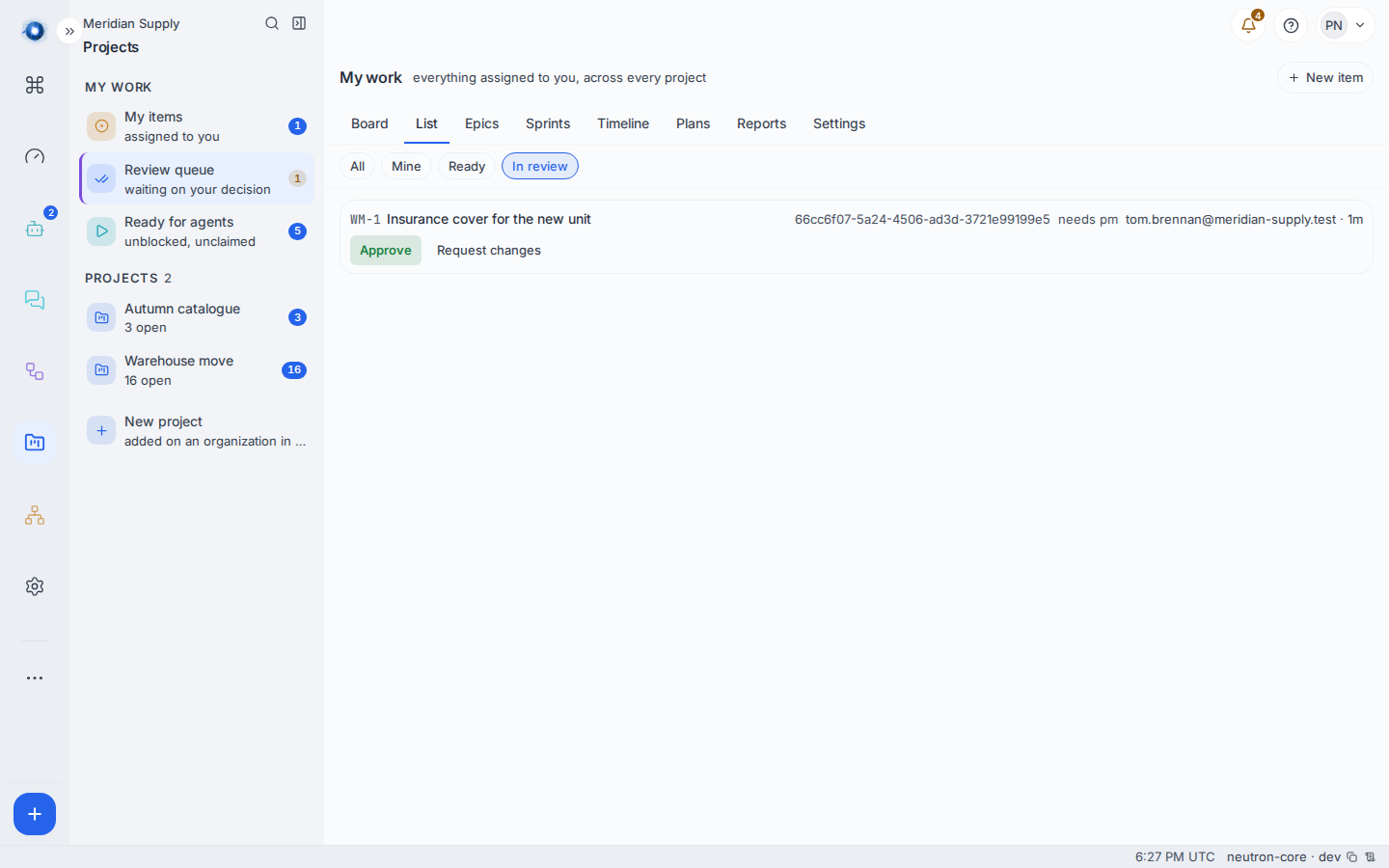
The number on the bell goes up. Review queue in the middle column carries a count. And the card itself, opened by anybody who may decide it, shows the decision at the top.
4. Decide it
Approve finishes the move: the card goes to Done.
Request changes asks for a note first — What has to change? — and then sends the card back to In progress with that note added as a comment, so the reason lives on the card rather than in somebody’s memory.
5. Know who “somebody else” is
The people who can decide a review on a project are its owner, its admin and its pm, plus anybody who administers the whole instance. Whoever asked is excluded from that list even if they are on it.
Those roles are granted on Settings › People: press the role beside somebody’s name. Pair it with the instance half in the same row, or they will hold the role and find every button refused.
A worked example
Tom is sorting out insurance for the new warehouse and it is the kind of thing one person should not sign off alone.
- He ticks Needs review on WM-1 Insurance cover for the new unit and leaves the reviewer as
pm. - The broker sends the extended schedule. He drags the card to Done. It parks: Parked for review — a reviewer decides it now.
- Priya, whose row on Settings carries pm, sees 1 on her Review queue. The row reads
WM-1 Insurance cover for the new unit · needs pm · 12m. - She opens it, reads the comments, and presses Approve. The card is Done.
- If she had pressed Request changes and typed the flood clause still stops at the mezzanine, the card would be back in In progress with that sentence as a comment under Tom’s.
What can go wrong
| The sentence on screen | What happened, and what to do |
|---|---|
| A reviewer has not decided this yet | Somebody tried to move a parked card on. It waits for the decision; there is no way round it from the board. |
| Nothing is waiting on your decision. | Your review queue is empty. If you expected something there, you are not on the list of people who may decide it. |
| nobody can decide this yet | The card asked for review and nobody who can decide it can also read the project. Grant somebody pm, admin or owner on Settings › People. The card is stuck until you do. |
| The card is parked and the Approve button is not there | You are the person who asked. Somebody else has to decide it. |
| That did not go through (403). | Your account may read the item but not settle its gate. |
| That did not reach the server. | The decision never arrived. Check the connection and press it again; deciding twice is harmless. |
Confirm it worked: after an approval the card is in Done and the review queue’s count has dropped. After a request for changes the card is in In progress and the note is the newest comment on it.