6 · Write a plan and get it signed off
What you will have done: written down what you intend to do before doing it, had somebody accept it, had somebody sign it off, and watched the work appear on the board as a result.
A plan is a decision, not a document
Neutron does not have a document editor and is not going to grow one. A plan here is a short record of what is being decided, why now, and in what order, with links out to wherever the real writing lives: a wiki page, a design document, a shared drive.
The thing it does that a document cannot: signing it off creates the work. One epic per phase, plus the items of the first phase, all landing on the board in one go, each remembering which plan minted it.
    flowchart LR
  D["draft"] -->|"Submit for review"| R["in review"]
  R -->|"Accept"| A["accepted"]
  R -->|"Request changes"| D
  A -->|"Send for signoff"| S["signoff"]
  S -->|"Sign off"| AC["active — epics minted"]
  AC -->|"Complete"| C["completed"]
  S -.->|"Withdraw signoff"| A
Three different people, deliberately. Anybody who can write on the project may submit. The accept belongs to the project’s owner or admin, or an instance administrator. The signoff belongs to the project’s owner, admin or pm. And the author is excluded from both decisions, whichever of those they happen to be.
The walkthrough
1. Start it
Open Plans and press New plan. Give it a title that names the decision — What is being decided? is the prompt — and a summary of one paragraph: what this changes, and why now.
2. Link the pages
Add a link per page the thinking lives on: a document, a design, a wiki entry, any address. Each link takes a kind, a short label and the address. This is the whole of what a plan says about the reasoning; nothing is copied in.
3. Write the phases
A phase is a stage of the work, and it is what becomes an epic. Under each phase, list the items it needs. Two or three phases is normal. Ten is a sign that this is really two plans.
4. Submit it
Submit for review hands it over. It is still editable in draft; once a decision is taken its text is fixed.
5. Somebody accepts it
Whoever owns or administers the project sees it and presses Accept, with a note if they want one, or Request changes, which puts it back to draft. They cannot be the person who wrote it.
6. Ask for signoff
Send for signoff raises a gate, the same kind that holds a card in review. The button on the plan then says exactly what pressing it will do: Sign off → mint 3 epics and 2 items.
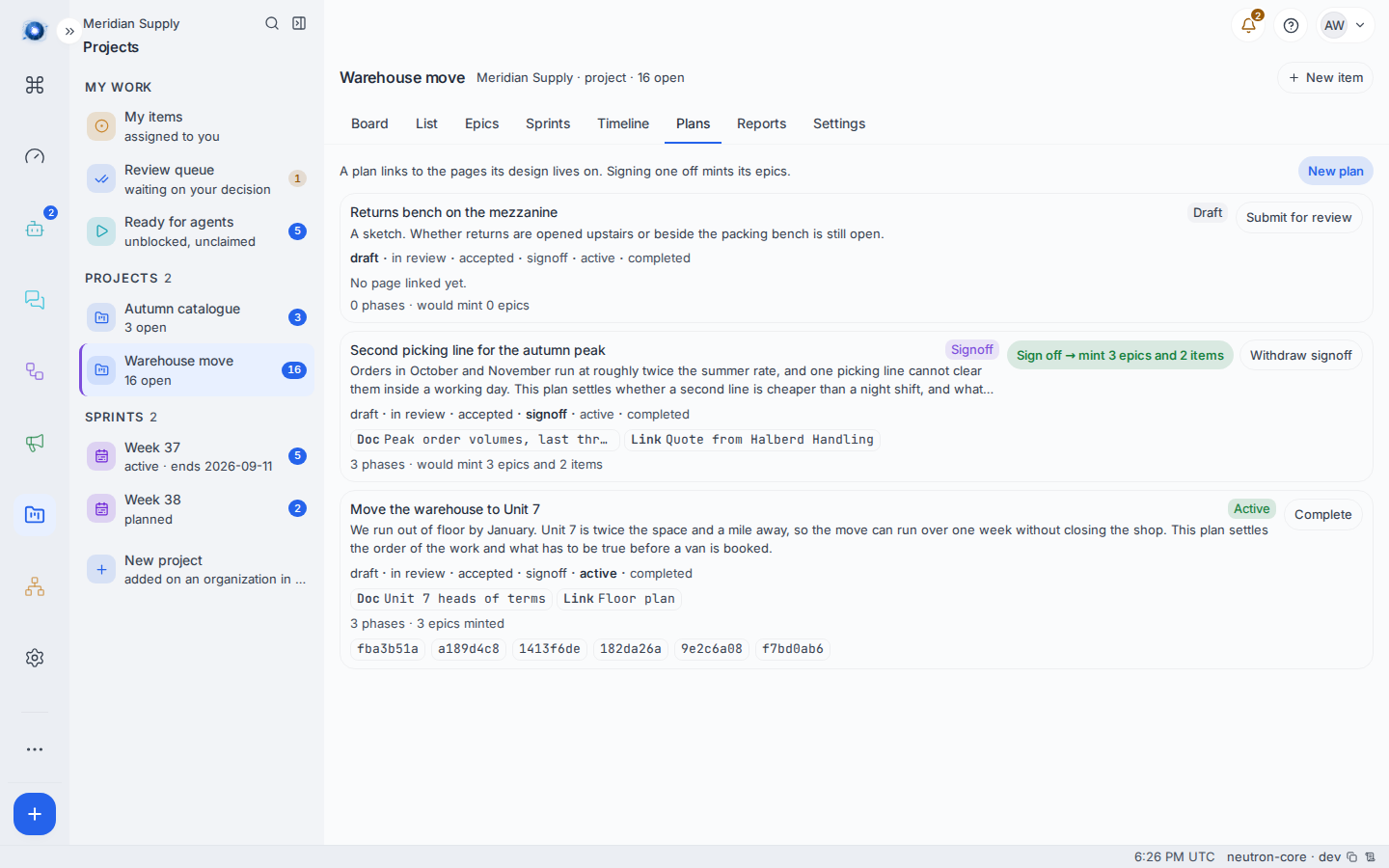
7. It mints the work
Approving the signoff creates, in one step: an epic for every phase, the first phase’s items as children of the first epic, and a record on each of which plan made it. The plan becomes active and its row now reads 3 epics minted rather than would mint. The author gets a notification.
8. Complete it
When nothing the plan minted is still open, Complete closes it out. If anything is open, the screen names what.
A worked example
Priya thinks Meridian Supply needs a second picking line before the autumn peak, and it is a big enough spend to write down first.
- She creates the plan Second picking line for the autumn peak, with a summary explaining that orders run at roughly twice the summer rate and one line cannot clear them in a day.
- She links two pages: the peak order volumes, and the quote from the equipment supplier.
- She writes three phases: work out what it costs, build the line, staff and rehearse it.
- She submits it. Ada, who owns the organisation, accepts it with the note worth doing if the conveyor comes in under the night shift over two peaks.
- Priya presses Send for signoff. Ada signs it off, and three epics appear on the board with the first phase’s items under the first one.
What can go wrong
| The sentence on screen | What happened, and what to do |
|---|---|
| A plan is decided by somebody other than its author | You wrote it, so you cannot accept it. Ask the project’s owner or an administrator. |
| Accepting a plan is the project owner’s or an admin’s | You may write on the project but not decide its plans. |
| Only the plan’s author or the project’s owner can pull this back | Withdrawing a signoff is limited to those three. |
| This plan has been decided — its text is fixed now | A plan stops being editable once it leaves draft. Withdraw the signoff, or write the change as a new plan. |
| Add a phase first — a signoff with none would mint nothing | The plan has no phases, so signing it off would create nothing. Add at least one. |
| Still open: WM-20, WM-21 | You tried to complete a plan whose minted work is unfinished. Finish or cancel those items. |
| Cannot move from draft to accepted | Something skipped a step. Submit it for review first. |
| That did not reach the server. | The action never arrived. Reload the screen and check whether it took. |
| An agent was asked to write the plan and refused | An agent cannot author a plan today. Its tool answers that a person writes one on the Plans screen. Write the draft yourself; an agent can then work the items it mints. |
Confirm it worked: the plan’s row reads active with N epics minted, and those epics are on the Epics screen with the first phase’s items under the first of them.