8 · Link work across projects
What you will have done: tied a piece of work in one project to a piece of work in another, read the far end without being able to change it, and pointed an item at an issue on a code host.
One row, two boards
When work in one project waits on work in another, the wrong answer is to copy the card. Two copies drift, and then nobody knows which is true.
A link is one row that both sides can see. The project that owns the card can move it. The project that merely links to it sees it, reads it, and cannot touch it.
    flowchart LR
  subgraph AC["Autumn catalogue"]
    P["AC-1 Book the print run"]
  end
  subgraph WM["Warehouse move"]
    L["WM-4 Sign the Unit 7 lease"]
  end
  L -->|"blocks"| P
  P -.->|"drawn on the Warehouse move board,<br/>read-only"| WM
The four kinds of link
| Kind | Reading it from this item | Does it stop anything? |
|---|---|---|
| blocks / blocked by | This has to be done before that | Yes. A blocked item cannot enter In progress. |
| precedes / follows | This comes before that | No. It is an order, and the timeline draws it. |
| relates to | These two are connected | No. |
| duplicates / duplicated by | These are the same thing twice | No. |
The walkthrough
1. Draw a link
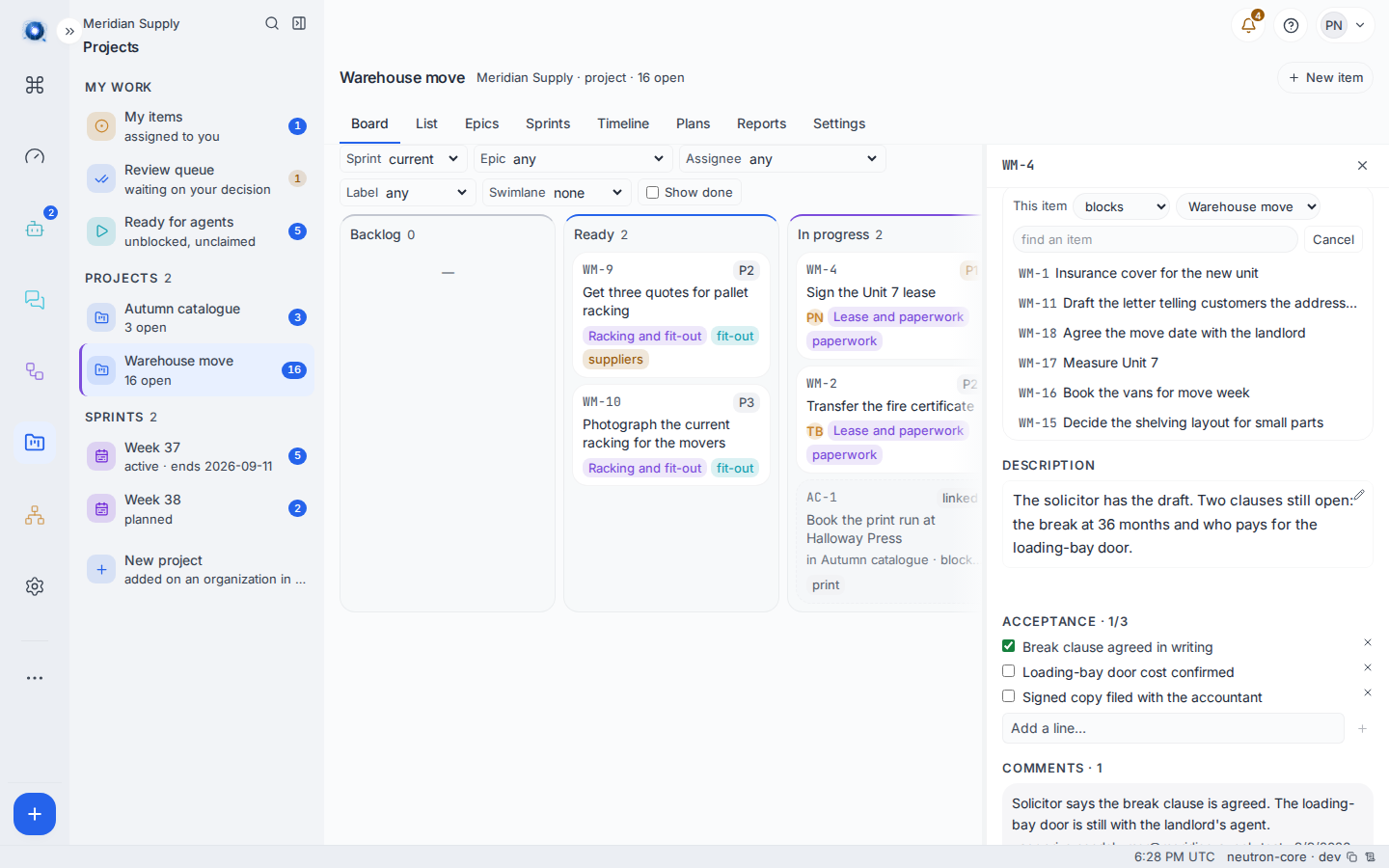
Open an item and find Linked items. Press Link and a row of controls appears: what this item does to the other one, which project to look in, and a box to find it by name or reference. Pick the item from the list under it and the link is drawn.
The project control is what makes a link cross a line. It offers every project you can read, so a card on one board can be tied to a card on another as long as you can see both.
2. See the links on an item
Linked items lists every link it carries, each with the word for the direction you are reading it from, the other item’s reference and title, its status, and the project it is in when that is a different one. The cross beside a row removes the link.
An item another board owns is read here and written there: its links show, and the controls that would change them do not.
3. See the far card on your board
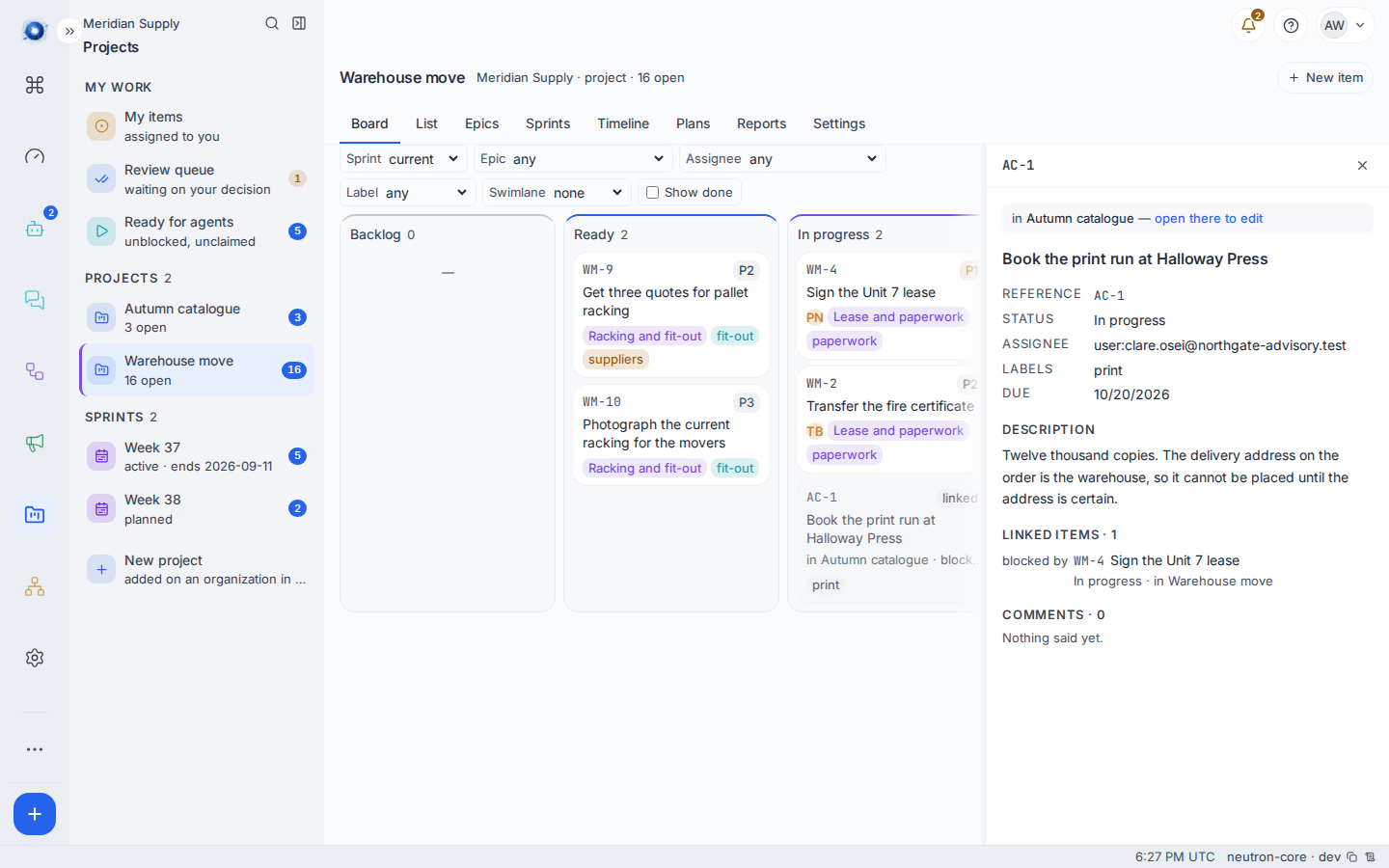
A card another project owns, linked to work on yours, is drawn on your board beside the column its status names, with a dashed border and the word linked. Under it: in Autumn catalogue · blocks this board.
It is not in the column’s count, because the count is your project’s size. It cannot be dragged, because it is not yours to move.
4. Open it
Clicking it opens it, read-only, with a line at the top saying which project it is in and offering open there to edit if you can reach that project.
5. Watch the blocker clear
When the far item reaches Done, the block is gone and the item on your board can be started. Nothing is copied and nothing is synchronised; there was only ever one row.
Naming an issue on a code host
An item can also point at an issue on GitLab or GitHub. Open the item, find Code host, paste the issue’s address and press Link.
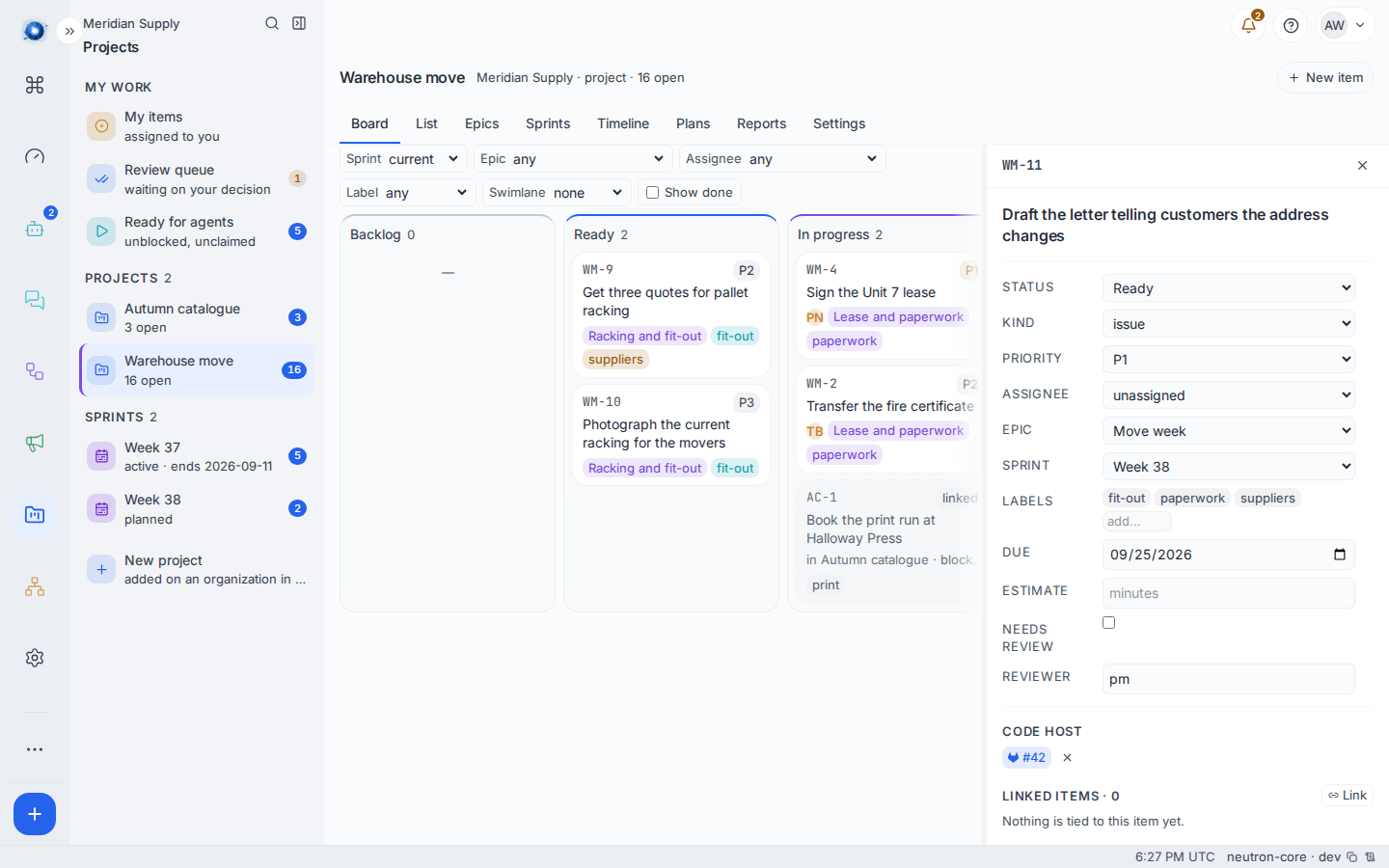
The address is read to work out which host it is; you do not pick one. An item holds one link at a time, and an issue is held by one item.
Neutron stays the tracker of record, and two things travel outward from it. Neither reads anything back.
The card’s status is written onto the issue as a label. A card entering In progress, In review or Done puts neutron:in_progress, neutron:in_review or neutron:done on the linked issue, replacing whatever the previous one said. That is the whole of it: the issue is never closed, never commented on, and its own state is never read. The other four statuses are not mirrored.
The label is written only when the instance actually holds a connection to that host. A link to an issue on a server Neutron has no credentials for is an address a person can click and nothing more. If the write fails, the card is not held up: it lands where you put it, and a line appears in its comments saying the label could not be written, naming the issue and why.
A merged change that names the item closes it. When a merge request on GitLab or GitHub is merged and its title or description names the item’s reference or the issue it is linked to, the card is moved for you, through the same door and the same rules a person’s drag goes through. If the card needs review, it parks for review instead of going to Done. Either way a comment is written on the card saying which change named it, including when the move was refused.
A worked example
Meridian Supply’s catalogue cannot be printed until the warehouse address is certain.
- Priya opens WM-4 Sign the Unit 7 lease, presses Link, leaves the kind on blocks, switches the project control to Autumn catalogue and picks AC-1 Book the print run at Halloway Press.
- Clare, who advises on the catalogue and is not on the warehouse project, opens AC-1 and sees blocked by WM-4 Sign the Unit 7 lease · In progress · in Warehouse move. She can read that much, and no more of that project.
- On the warehouse board, AC-1 appears as a dashed card in the In progress column: in Autumn catalogue · blocks this board. Priya can see what her lease is holding up.
- The day the lease is signed, WM-4 goes to Done and AC-1 stops being blocked.
What can go wrong
| The sentence on screen | What happened, and what to do |
|---|---|
| an item in a project you cannot read | The link is real and the far item is behind a wall. The edge is still shown, because a card blocked by work you cannot see is still blocked. Ask to be added to that project. |
| You cannot read the project that item is in | The item you picked is in a project you cannot reach. Reaching one end of a link is not permission over the other. |
| Nothing is tied to this item yet. | The item has no links. Press Link to draw one. |
| Nothing here matches. | No item in the project you are searching answers to what you typed. Try the project control. |
| A comment appears reading Could not label gitlab … | The card moved and the linked issue could not be told. The card is where you put it; the issue is out of date. The line says why. |
| That is not a GitLab or GitHub issue address. | The address is not an issue page. Copy it out of the browser’s address bar on the issue itself. |
| Another item is already linked to that issue | One issue, one item. Find the item that holds it. |
| This item is linked to another issue — remove that link first | One item, one issue. Remove the existing link with the × beside it. |
| That item came from a code host and names its own issue | The item arrived from a code host, so it already is that issue. There is nothing to link. |
| This item has no code-host link | You tried to remove a link that is not there. |
| A merged change did not move the card | Only GitLab and GitHub are watched. Other hosts do not report merges. Also check that the change actually names the item. |
| A merged change moved a card you did not expect | A change that merely mentions an item’s reference counts as naming it, not only one that says it closes it. Be sparing with references in merge descriptions. |
Confirm it worked: the far item appears under Linked items with the right direction word, and a card another project owns shows on your board with a dashed border and the word linked.