3 · Importing leads
What you will have done: put a list of people into a campaign, with companies behind them or without, corrected the column mapping before anything was written, understood every row the engine refused, verified the addresses that landed without a verdict, found them on the Pipeline, and removed the import again if the file was wrong.
A person, and sometimes a company
A lead is a person. A company is context about that person: where they work, or the business they run.
Most outbound goes to people at companies, and for those the two are kept apart.
    flowchart LR
  A["A company<br/>Aldermoor Leather"] --> B["A person<br/>Jonathan Church"]
  A --> C["A person<br/>Naomi Frost"]
  B --> D["Letters, replies, a deal"]
  C --> E["Letters, replies"]
One company may have several people; a deal belongs to the company, so two people answering cannot owe you two commissions.
Some of the people worth writing to are not at a company at all. A maker who sells from her own shopfront, an illustrator, a sole trader. They are leads in exactly the same way, and the engine holds them on their own, with a handle where the company name would sit.
    flowchart LR
  F["A person<br/>Nell Harrowfield<br/>@harrowfieldmakes"] --> G["Letters, replies, a deal"]
Who the campaign is for
Before the file matters, the campaign does. Every campaign is for Businesses or for Individuals, and you chose which when you created it (journey 2).
Businesses is the default, and nothing about it has changed. Every campaign that existed before the choice appeared is a Businesses campaign and behaves as it always did.
The choice cannot be changed afterwards. The rows already imported were admitted under it, and moving the rule under them would leave people in a campaign that its own rule would now refuse.
It changes three things.
What a row needs.
| Campaign | Every row needs a name, and |
|---|---|
| Businesses | a company: a website, a work address, or a company name. |
| Individuals | any one of a company, an email address, or a handle. |
Whether a handle says who somebody is. In an Individuals campaign a handle identifies a person, the way a domain identifies a company. In a Businesses campaign it does not. A bought company list routinely carries the company’s Instagram in a column beside every employee on it, and reading that as an identity would collapse a whole company into one person. The handles still land on the people either way; in a Businesses campaign they are simply not used to tell people apart.
Which consent rule applies. Everybody in an Individuals campaign is written to under the rule further down this page.
The walkthrough
1. Open the import panel
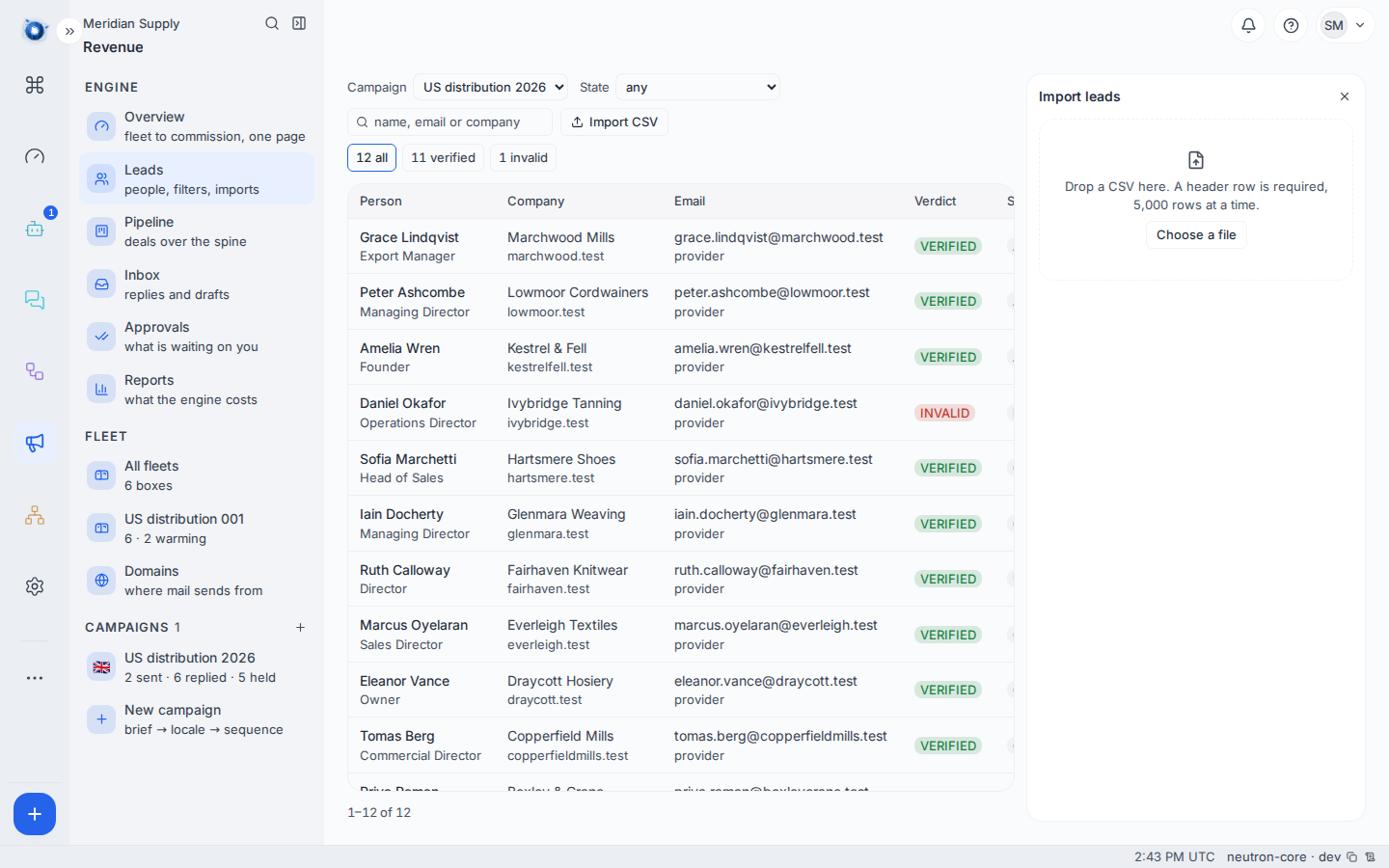
Revenue › Leads, then Import leads. It is also on the cockpit, top right.
2. Know what the file has to carry
A comma-separated file with a header row. The headers can be worded however your source worded them. You are not renaming columns before an import; that is what the mapping step below is for. What the engine looks for is:
| What it reads | Needed | Notes |
|---|---|---|
| Name | yes | Their full name. A surname in its own column is read too. |
| Company | in a Businesses campaign, unless a website or a work address names one | The company’s name as you want to read it. |
| Email or Website | either of them, or the company name | The domain taken from either identifies the company, and is trusted ahead of the name. |
| Instagram, TikTok, YouTube | no | A handle or a link to the profile. In an Individuals campaign any one of them will admit a row on its own. |
| Followers | no | The size of the audience, as a number or as 12.4k. |
| Where consent came from | no | The only thing that records consent. See below. |
| Job title, Opening line, Country, Status | no | Carried through if they are there. |
The domain identifies the company, not the name. Two rows with the same domain are the same company however the name is spelled.
One follower count belongs to one platform. A sheet usually carries several handle columns and a single audience figure, so the figure is filed against the first handle column the file lists, which is the same for every row in it. If your sheet counts TikTok followers and lists Instagram first, move the columns before you upload.
3. Check the mapping
The engine reads your headers and proposes which column is which. That proposal is shown to you before anything is written, and every field is a dropdown you can change. Nothing about the guess is final.
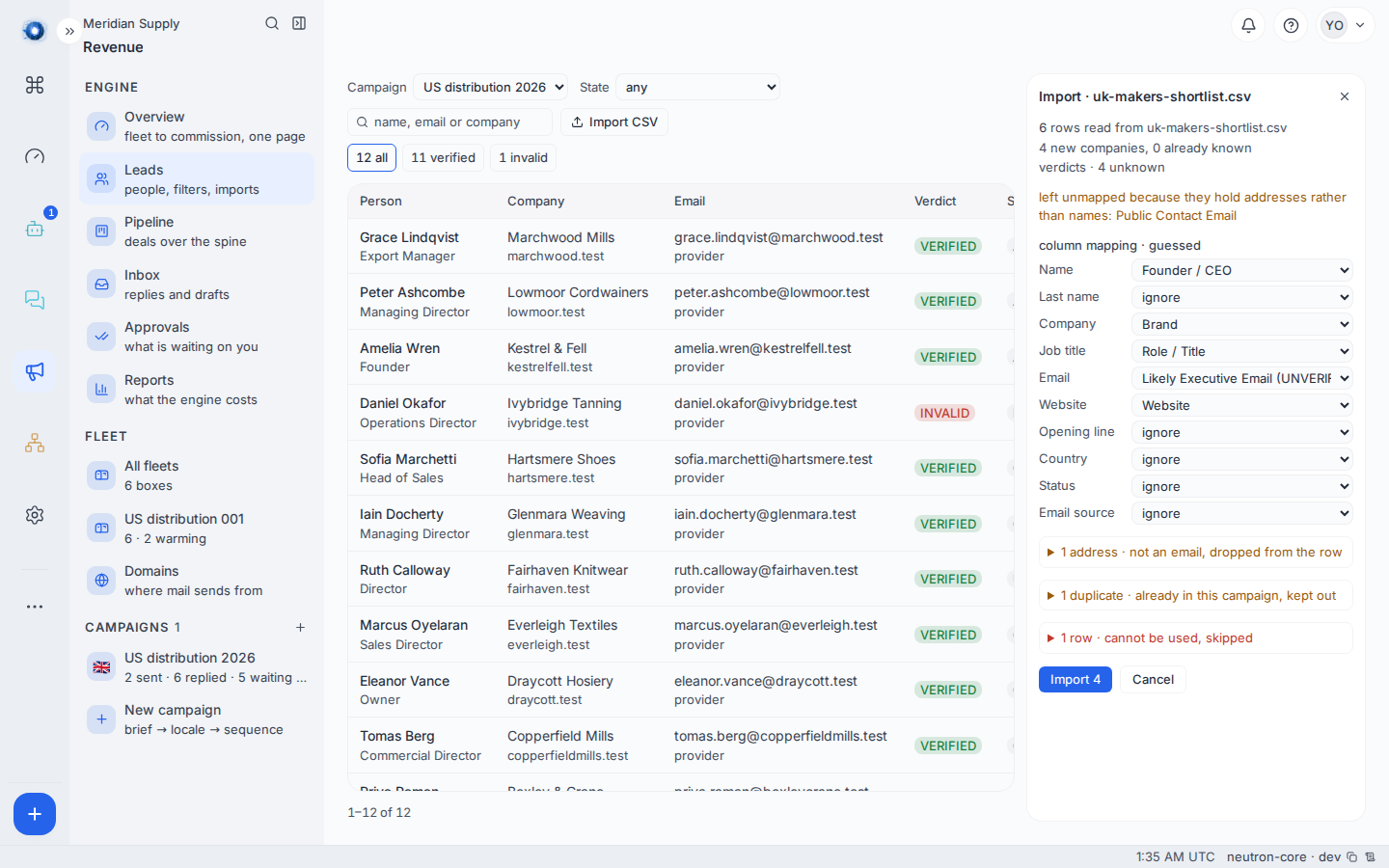
The guess reads the values as well as the headers, which is what makes a bought list work without hand-mapping it first. On the list in the picture it finds the person under Founder / CEO, the company under Brand, the role under Role / Title and the address under Likely Executive Email, none of which are the words the engine uses for those fields.
It refuses a column whose contents contradict its heading. A column of info@ and hello@ addresses under a heading like “Contact” is not offered as anybody’s name, because a name is what it is not. Where a sheet holds two columns of addresses, the one with fewer switchboard mailboxes in it is taken as the person’s.
Two of those guards are about the new columns. A handle column is the one place a web address is right, so instagram.com/harrowfieldmakes is accepted there and nowhere else. And a column of ticks, or of Yes and No, never becomes the consent column, because a ticked box is not a record of where consent came from.
A small model reads the columns too, while you are looking at them. The mapping above is on screen at once and is yours to edit immediately; the model runs behind it and its reading arrives in the report you are already reading. You never wait for it. That is what makes a sheet nobody anticipated map itself, because a synonym list is never finished and the next file writes “Beslutningstager” or “Direct line email”.
The model oversees; it does not decide. Its answer goes through the same guard the guess does, so a column of addresses is still refused as a name, a header it invented is dropped, and one column still fills at most one field.
Change any field you disagree with, and the mapping you leave is the one that gets imported. Setting a field to ignore leaves that column out. A field you set yourself is yours: the model is not asked about it and the report says so.
4. Read the report
The import does not write anything until you say so. First it shows you what would happen: how many companies, how many people, and every row it will not take.
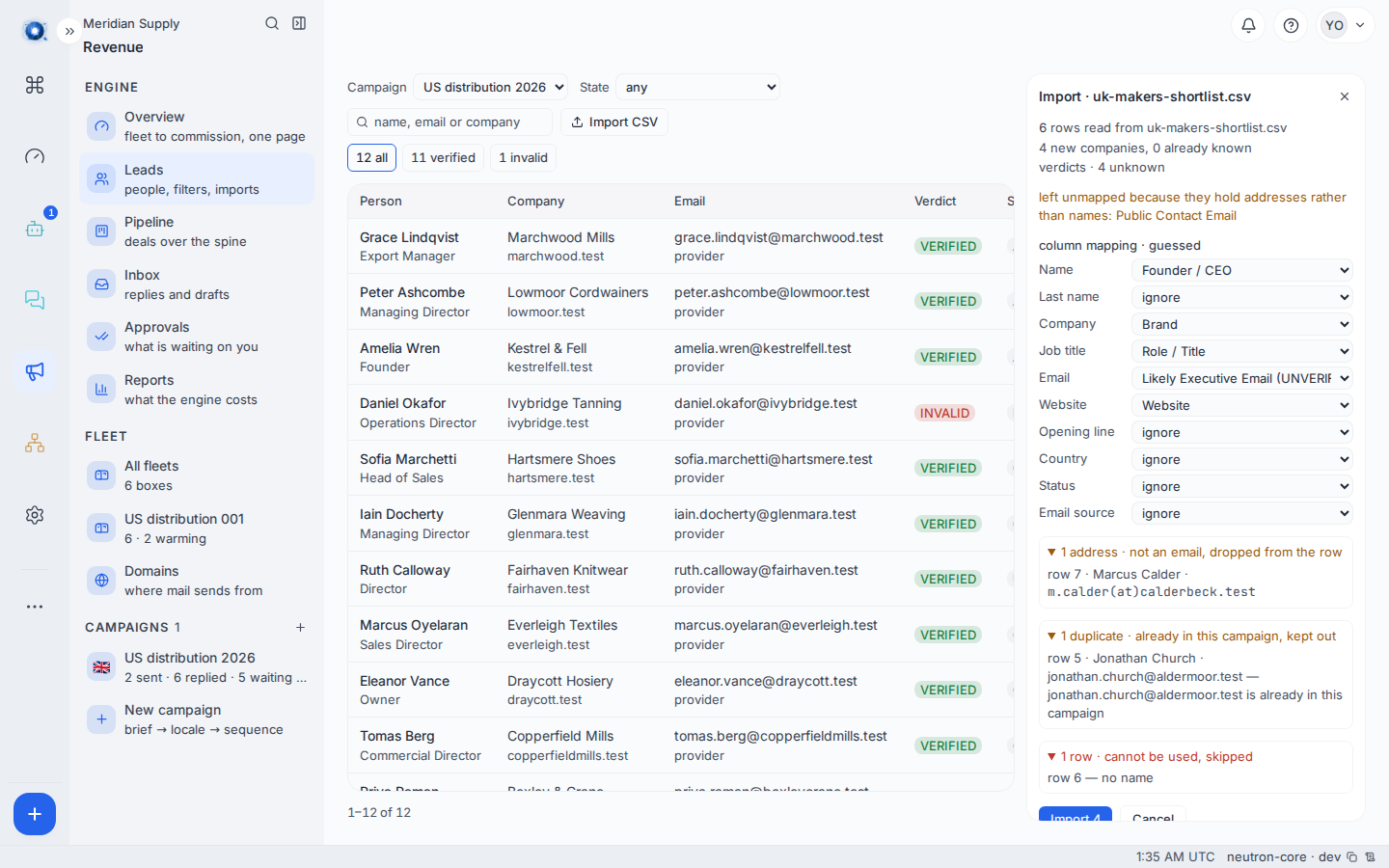
One line above the mapping says who read it. It has three states, and the first is the one you meet.
column mapping · guessed, and a model is reading the columns now…
The report is complete and the mapping is editable while that line is up. Then it becomes one of two things. Either
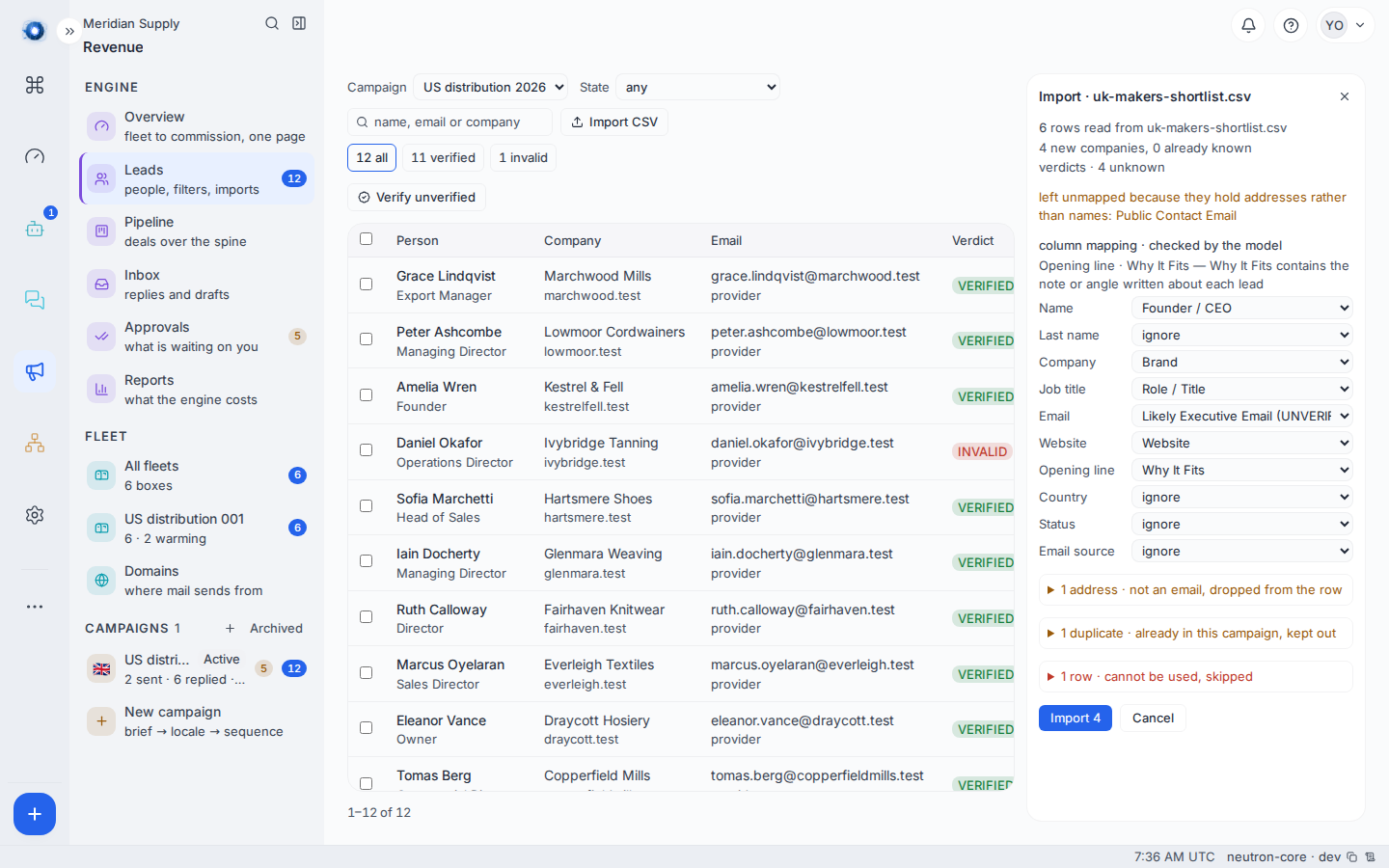
column mapping · checked by the model
with a line for each field the model moved and the reason it gave, and the mapping under it changes in place:
or
column mapping · guessed, not checked
with the reason. A model that is down, slow or talking nonsense changes nothing: the guess stands, the import runs, and the line says which mapping you are looking at. An import never waits on the model and never fails because of it.
A reading that moves a column moves the counts with it, so the preview is taken again on the corrected mapping rather than the label being changed over numbers that no longer describe it. In the picture the model claimed Why It Fits for the opening line, which the header guess had left out.
You are allowed to get on with it. Edit a column or press import while the reading is still out and the import proceeds; the record simply says the mapping was not checked because the operator did not wait. That is what happened, and it beats a state that reads as a check still running long after the file landed.
A column left out is named, not silently dropped. Where a column holds addresses and nothing claimed it, the report says so in as many words:
left unmapped because they hold addresses rather than names: Public Contact Email
That sentence is the one to read before you press import. It means the engine saw the column, decided it was not a name, and left it alone rather than putting a switchboard address where a person’s name belongs. If that column is the one you actually wanted, map it yourself in the step above.
Each row the importer refuses, and each cell it drops, comes with a reason, and each reason means something specific.
| Reason | What it means | What to do |
|---|---|---|
| No company | A Businesses campaign, and nothing on the row names a company: no company name, no website, and no work address to take a domain from. A personal address does not name one. | Add a company or a website, drop the row, or put the list in an Individuals campaign. |
| No company, no address and no handle | An Individuals campaign, and the row carries no way to find this person again. | Add an address or a handle. |
| No name | Nobody is named on the row. | Nothing lands for that row, the company included. Name them, or drop it. |
| Two people | The row’s address belongs to one person and its handle to another. | Read the two names the report gives and split the row, or correct whichever cell is wrong. |
| Already here | This person is already in this campaign, by address, by handle, or by their name at their company. | Nothing. It is not a mistake, and any handle the row carries that they do not hold yet is still added to them. |
| Suppressed | Somebody at this address asked never to be written to. | Nothing. This is the engine protecting you. |
| Not an address | The cell in the email column is not a valid address. | The person still imports; the cell is dropped and named. Fix the typo and import again to give them an address. |
5. Import, then look at the Leads screen
Confirm, and the rows land.
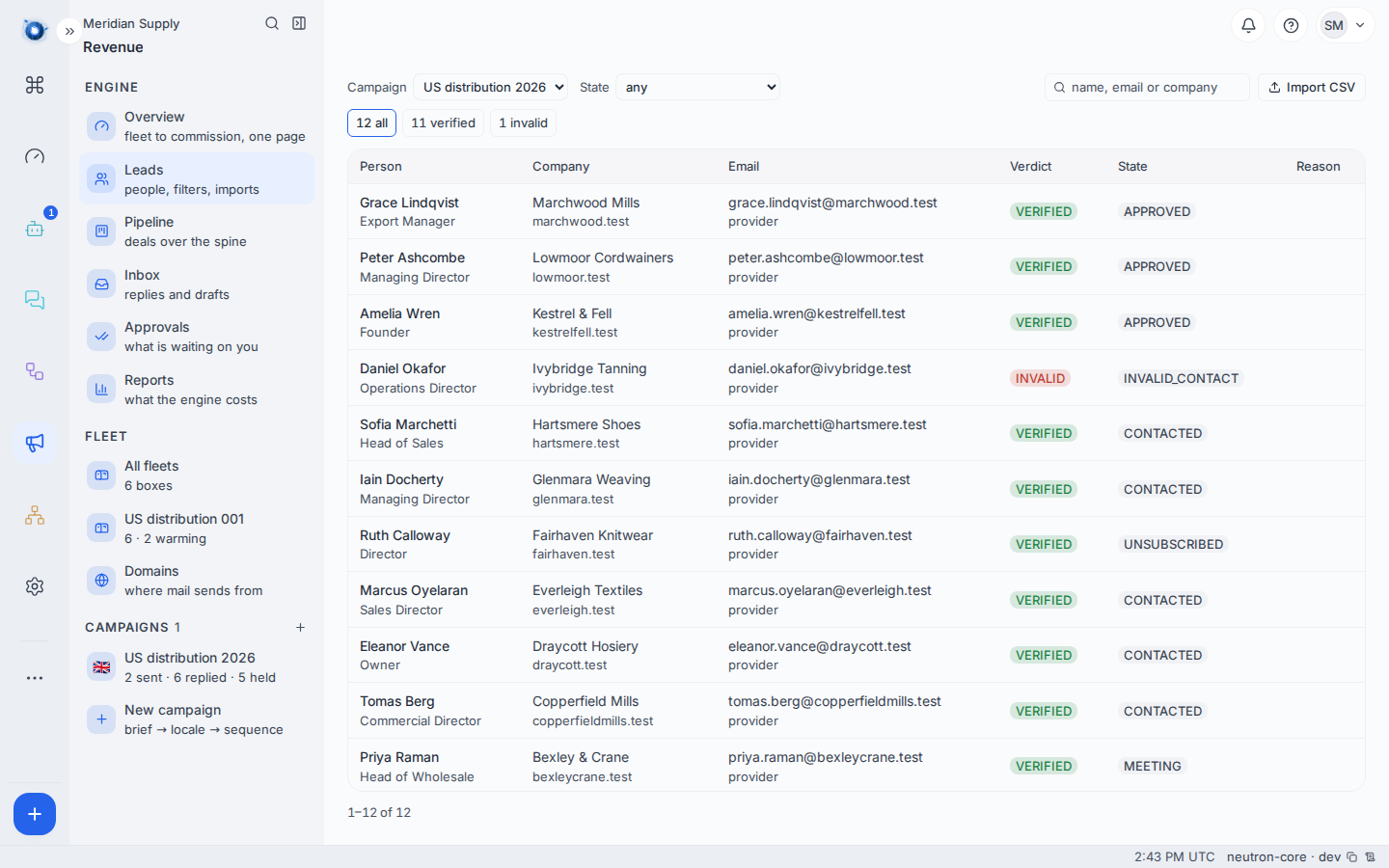
Each person carries a verification state: verified means the address was checked and answered, catch-all means the domain accepts anything so nothing can be proven, invalid means it bounced, and no email means there is nobody to write to yet.
Only verified people are written to. The rest sit there until something proves them.
A person with no company reads as themselves. Where the company name would be, the table shows the handle they were admitted on, and their handle sits under their name wherever their name appears. Nothing is invented to stand in for the company they do not have.
6. Verify the addresses
A freshly imported person carries no verdict at all, and the campaign day skips anybody without one. Something would prove them eventually. Verify is how you stop waiting for it.
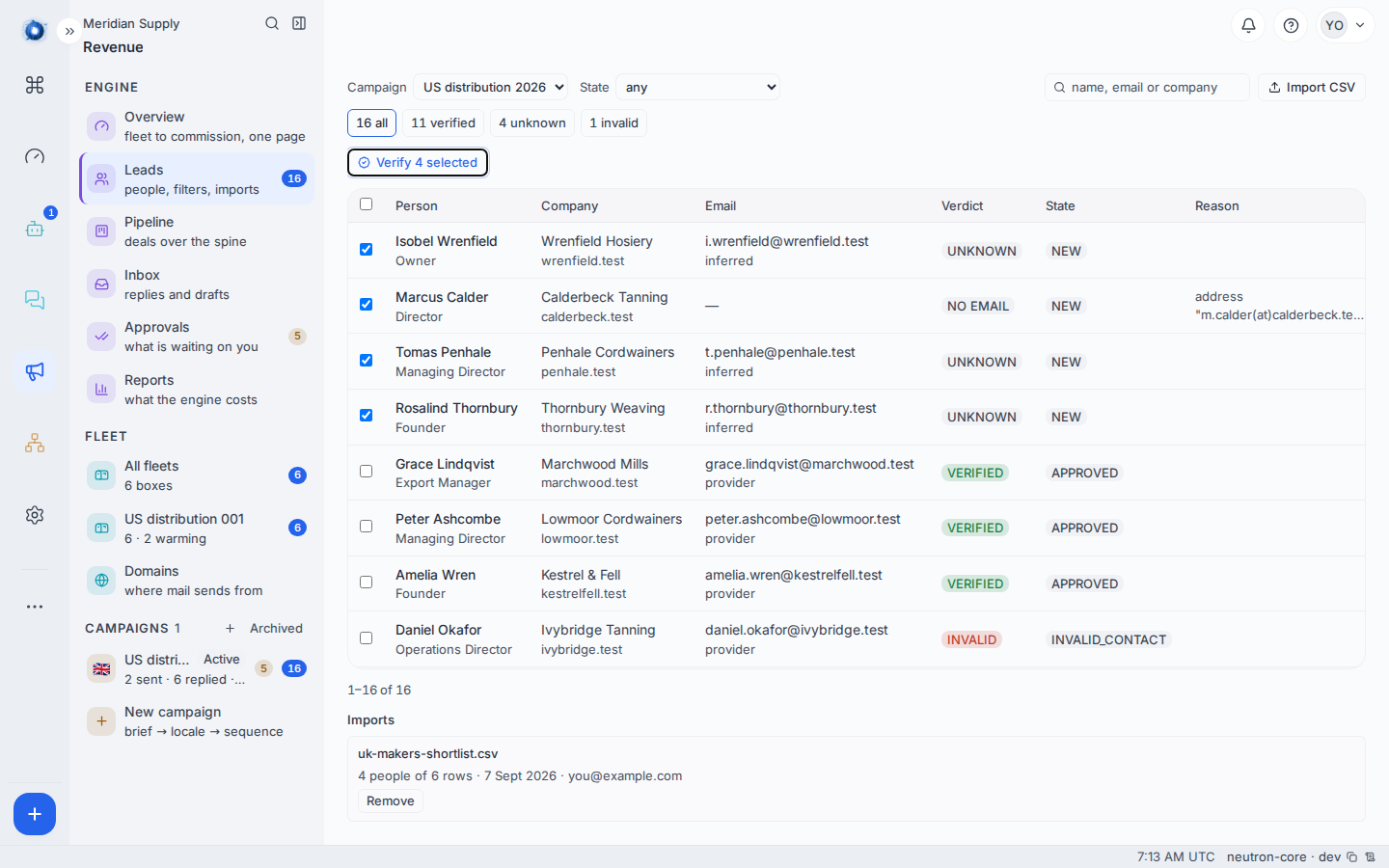
Above the table sits one control. With nothing ticked it reads Verify unverified and means everybody in this campaign who has an address and no verdict, which is exactly the population the day skips. Tick some rows and it reads Verify N selected and means those. The tick box in the header takes the page you are looking at and no more, so it cannot quietly select people who are not on screen.
Ten at a time. The checks cost network and money, so a run takes ten and tells you how many are left to do. Press it again for the next ten.
Afterwards, one sentence says what came back, worst news first, and how many remain. A cost appears only when something was actually bought. Most addresses are settled by checks that cost nothing, and a run that spent nothing says nothing about money.
A bounced address is not cleared by a weak answer. Somebody marked invalid stays invalid unless a check comes back verified, which is the one verdict allowed to overwrite a bounce; probable or catch-all will not move them.
The Overview’s next step links straight here, with the control ready, when unverified people are what stands between the campaign and its first letter.
7. Find them on the Pipeline
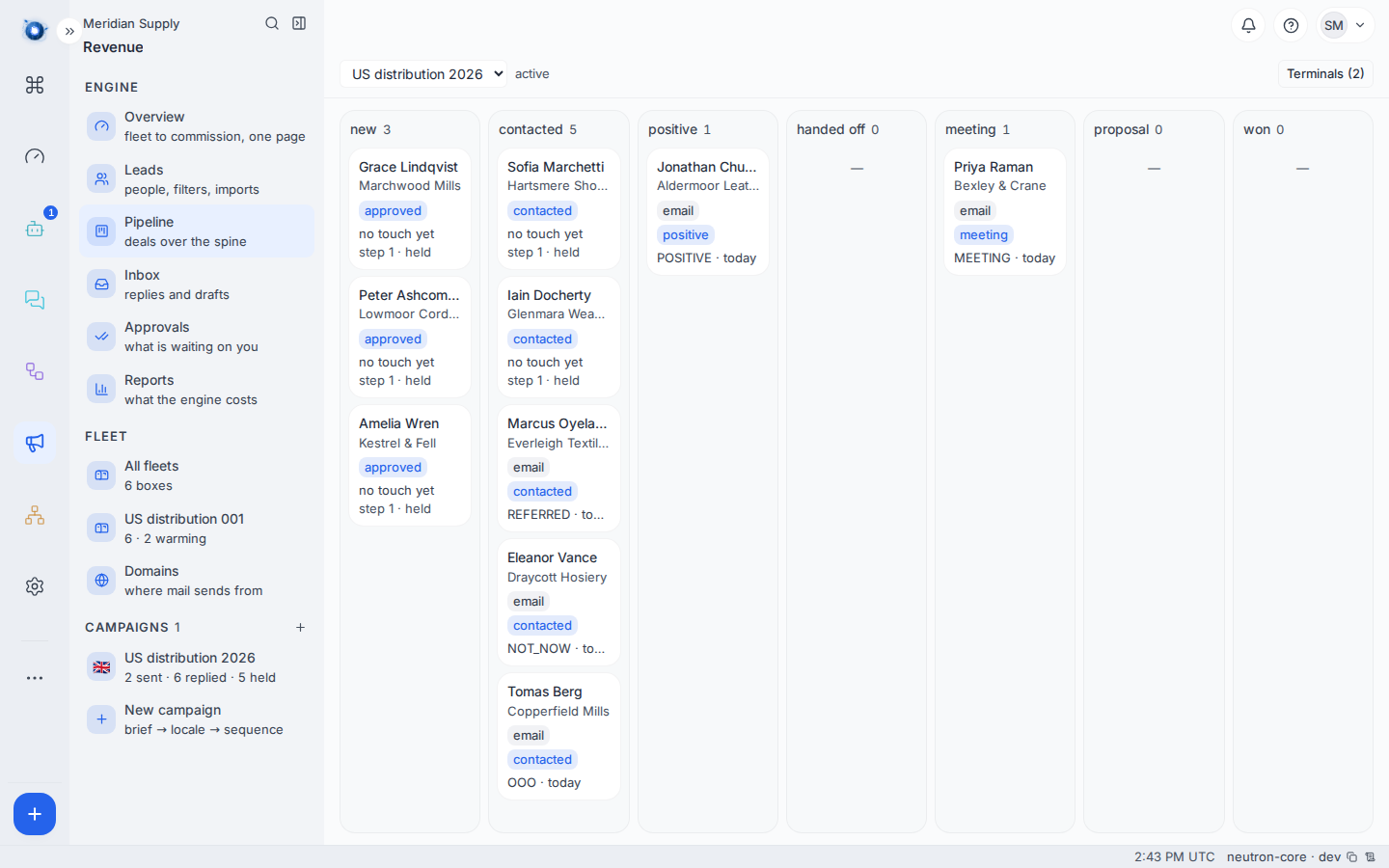
Freshly imported people appear in the first column and move right as things happen to them. Nothing has been sent yet.
8. Re-import a corrected file
Fix the file and import it again. Rows already present are recognised and left alone; only the new and corrected ones land. You cannot create a duplicate company by importing twice, and you cannot create a second copy of a creator either.
A second sheet is usually not a pure repeat. It adds a TikTok beside somebody the campaign already holds by their address, and that is worth having, so a handle on a duplicate row is written onto the person it duplicates. A handle they already hold is left exactly as it was. An address is treated the same way: somebody matched by their handle who has no address on file gets the one the sheet carries, and an address already on them is never overwritten by an import.
How two rows become one person
The engine asks three questions in order, and stops at the first one that answers.
    flowchart TD
  A["The same email address?"] -->|yes| S["One person"]
  A -->|no| B["The same handle on the same platform?"]
  B -->|yes| S
  B -->|no| C["The same name at the same company?"]
  C -->|yes| S
  C -->|no| N["Two people"]
The address comes first because it is the one key that survives somebody changing employer inside a campaign. The handle comes next, because plenty of the people worth writing to give no address at all. The name at the company comes last, and only where there is a company to key it on. In a Businesses campaign the middle question is not asked.
Every spelling of a handle is one handle. @harrowfieldmakes, harrowfieldmakes and instagram.com/harrowfieldmakes/?hl=en are one person, and so is the same address with the tab that was open when somebody copied it. What survives is the word itself, lower-cased, on the platform whose column it came from. The same word on Instagram and on TikTok is not by itself the same person, because the platform is part of the identity.
A row that is two people is refused rather than guessed at. Where the address belongs to one person the campaign already holds and the handle to another, neither answer is safe: one writes an address onto somebody who never gave it, the other attaches a handle to somebody who does not hold it. The report names both people and leaves the row for you.
Who may be written to automatically
Some people may be sent to without asking them first, and some may not. The engine decides that per person, not per campaign.
An individual is anybody in an Individuals campaign, and anybody at a personal mailbox such as Gmail in any campaign at all. A sole trader who put her Gmail address on a company list is an individual too, whichever campaign she landed in.
An individual is written to automatically only where a consent has been recorded. Without one, the letter is minted and then held, with the reason no consent, and it waits. Nothing is sent and nothing is lost.
The law allows one other basis, the soft opt-in, for somebody who is already your customer. The engine has a place to hold it and nothing writes one yet, so today a recorded consent is what lifts the hold.
This is UK PECR regulation 22 made mechanical: marketing mail to a person at their own address needs their consent, and reading a campaign’s dropdown is not how you find out whether you have it.
Consent is recorded from one place: a column in your file that says where it came from. Map that column, and any row whose cell is filled records a consent, keeping the cell itself as the source and the import time as the date. An empty cell records nothing.
Y, a 1 or the word Yes is a box somebody filled in on a spreadsheet, and the engine refuses it as a consent source rather than treat it as one. Nothing else in the import panel sets consent, and no agent can be asked to.A second sheet that says nothing about consent is silent, not a withdrawal. It never takes away a basis an earlier file recorded.
Removing an import that was wrong
A file that mapped badly, or was the wrong list altogether, can be taken back. An import that has sent nothing can be removed, and the people and the companies it created go with it.
There are two ways in, and they remove the same thing.
From the report, straight after the import. The panel that reports the write offers Roll back this batch underneath it. This is the one to reach for when you spot it immediately.
From Leads, at any time afterwards. Under the table is a list of every file this campaign was loaded from, newest first, with how many people it brought in out of how many rows, the day it landed and who loaded it. Each one has a Remove that asks once before it goes.
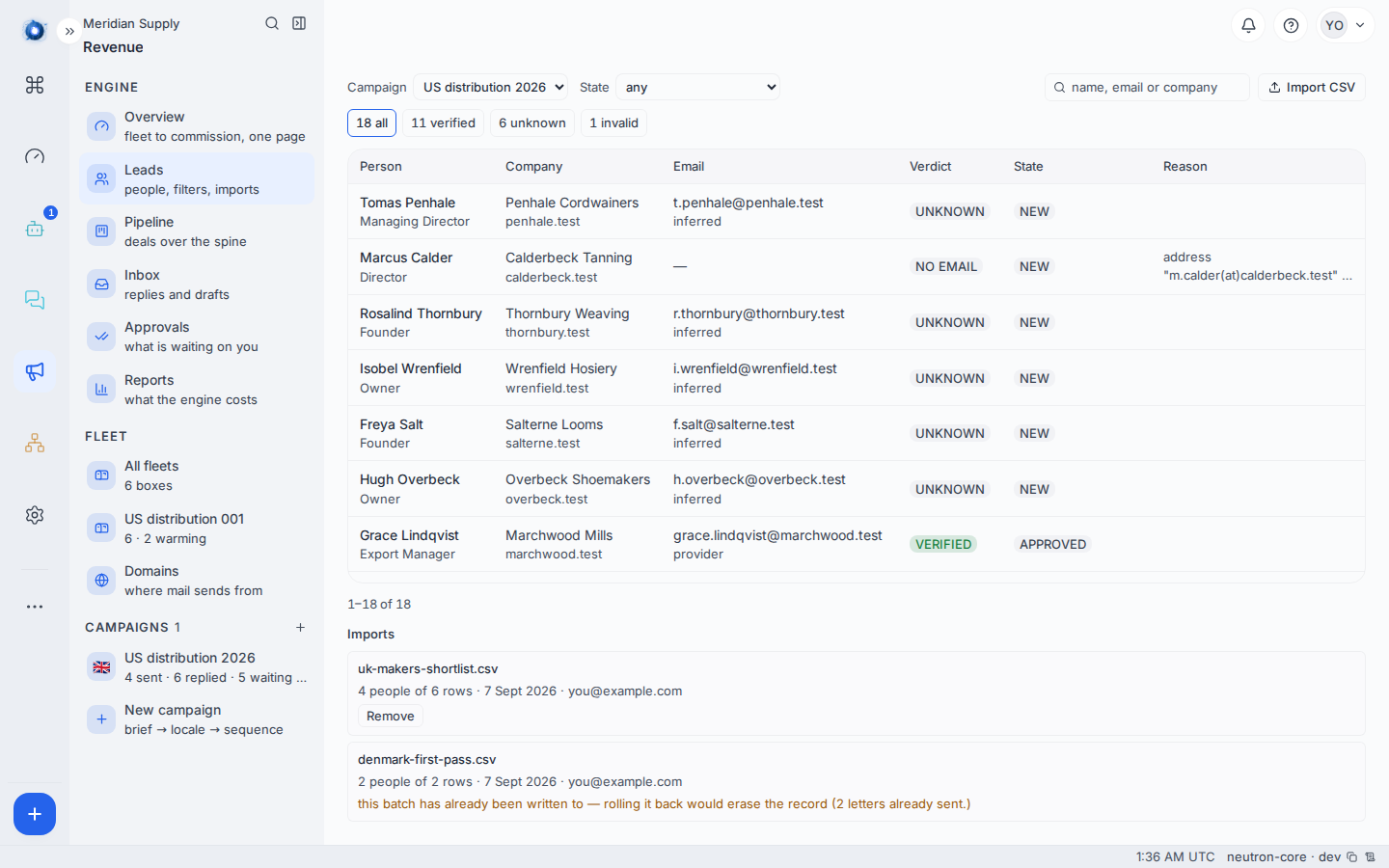
The second way is the one that matters after the fact. The report only exists in the session that ran the import, so closing the tab used to take the only way back with it, and a colleague looking at somebody else’s bad import had none at all.
Where somebody in the batch has a deal on them, they and their company stay and everything else goes. The batch is kept and marked rolled back rather than disappearing, so the record of the undo survives too.
A worked example
Meridian Supply import a file of fourteen rows into a Businesses campaign. The dry run reports twelve people at twelve companies, two rows it will not take, and one address it will drop.
The two it refuses are a person already in the campaign, matched by their address, and a row naming nobody. The dropped address is a typo, and that is not a refusal: the person still imports, with no address on them, and the report names both the row and the cell it threw away.
They import as it stands and correct the one address by hand afterwards. Leads reads 12 people · 11 verified · 3 schedulable. The twelfth is the person whose address was a typo, and nothing can be sent to them until it is right.
Eleven verified, three schedulable, because schedulable also needs a healthy domain and a sending address, and most of their fleet is still warming.
Their second campaign is for Individuals: forty makers who sell direct, from a list a colleague built at a trade fair. Most rows carry an Instagram handle and no company at all, nine carry a Gmail address as well, and one column records which stall each maker signed up at.
The dry run reports thirty-eight people, one row refused because its address and its handle point at two different makers listed earlier in the same file, and one refused for carrying a name and nothing else. Thirty-one of the thirty-eight record a consent, from the stall column. The other seven signed up nowhere, so they land, sit on the Pipeline, and their first letters wait held on no consent until somebody has a basis to record.
What to do if
Everything was dropped. Almost always the header row is missing or the separator is a semicolon. Open the file in a plain text editor and look at the first line.
The counts are lower than your spreadsheet. Two rows for the same domain are one company. That is usually right.
Every row with a handle and no company was refused. The campaign is a Businesses campaign, where a row still has to name a company. Import that list into an Individuals campaign instead. The kind cannot be changed on the campaign you already made.
A handle column imported but nobody was deduplicated by it. Same cause. A Businesses campaign records handles and does not read them as identities.
A row was refused as two people. Its address is somebody the campaign already holds and its handle is somebody else. The report names both. One of the two cells is on the wrong row, and only you can say which.
Somebody is “catch-all” and you know the address is good. Catch-all means their mail server accepts every address, so nothing can be proven either way. Verify it another way and correct the person by hand.
The consent column was ignored. It holds ticks or Yes and No, which is not a record of where consent came from. Put the source in the cells, or record the basis another way, and read the section above before you send to that list.
Every letter in an Individuals campaign is held on “no consent”. Nothing is broken. The campaign is behaving as it is meant to. Those people have no recorded basis, and the letters wait until one is imported.
The follower counts are on the wrong platform. One count belongs to the first handle column in the file. Reorder the columns and import the file again.
People imported but the Pipeline is empty. Check the campaign filter at the top of the board — you may be looking at a different campaign.
Everybody came in named after an address. That is the defect the mapping guard exists to stop, so on a current instance it should not happen. If you see it on an older import, remove the batch from the list under Leads and import the file again; the guess will refuse the column this time, and the Leads table shows a dash rather than the address wherever a name is one.
A column you wanted was ignored. The report names an address column it left out. Any other column is yours to claim in the mapping step, which is offered on every import.
Remove is not offered on a batch you want gone. Somebody in it has been written to. That refusal cannot be overridden, and it is deliberate.
The report says the mapping was not checked. The line beside it names which of three things happened: the model did not answer in time, it could not be reached, or its answer could not be read. The import never waited for it. The mapping you are looking at is the header guess, which is the same mapping every import used before the check existed. Read it more carefully than usual, correct anything it got wrong, and import.
Verify says nothing came back. Everybody in the campaign already carries a verdict, so there was nobody to check. The chips above the table are where to look for who is in which state.
The campaign day still skips people you have verified. Being verified is one of three things a letter needs. The other two are a healthy domain and a sending address, which are the Fleet and Domains screens.
Confirm it worked: Revenue › Leads shows the number of people you expected, and the Pipeline’s first column has them in it.