4 · Approving the first sends
What you will have done: read the letters waiting on you, understood the three checks on every row, approved a batch with the keyboard, and worked out why a letter is held.
The walkthrough
1. Open Approvals
Revenue › Approvals. It is one queue across every campaign, not one per campaign.
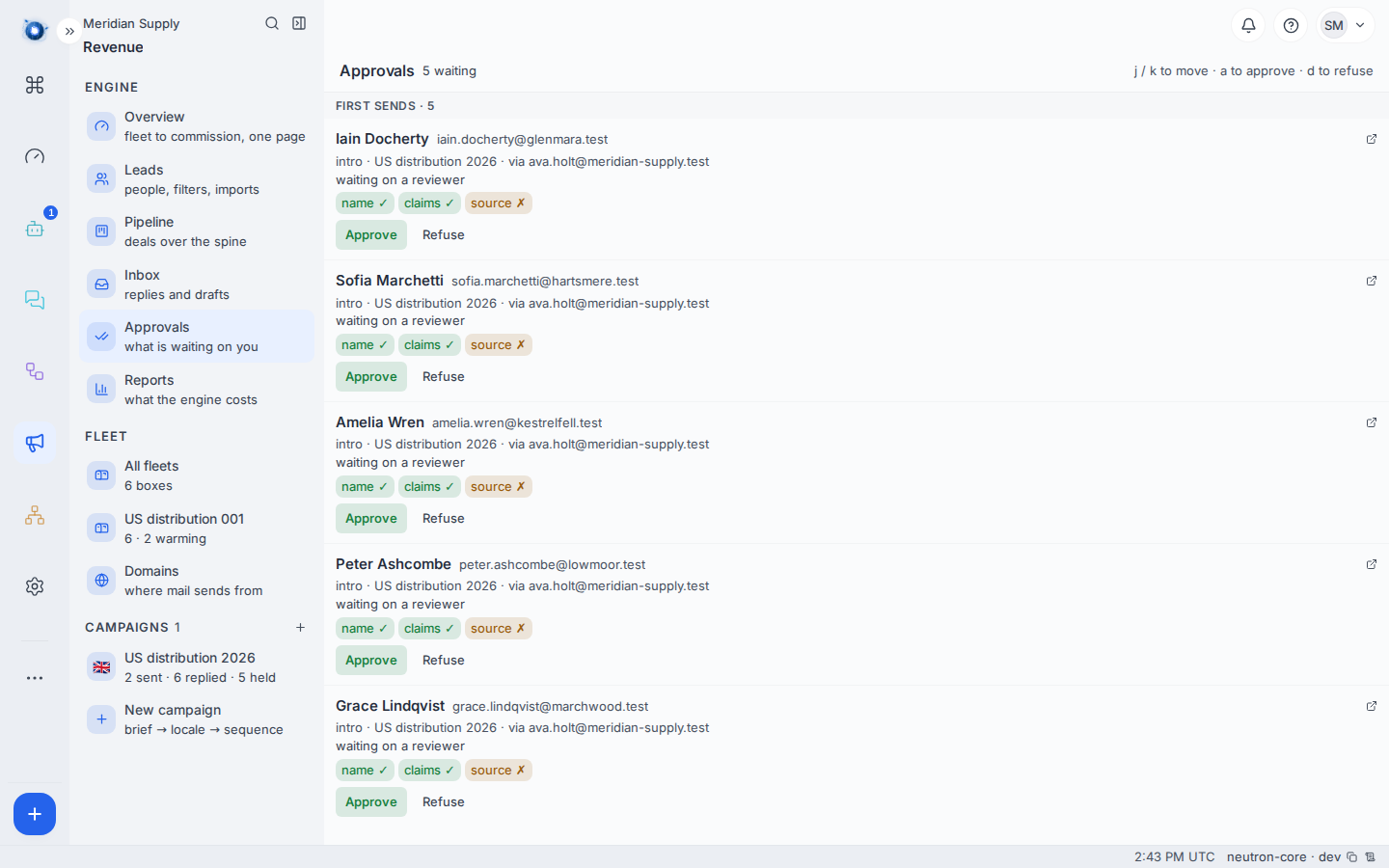
The heading counts what is waiting. Rows are grouped by what the decision actually is — first sends are letters nobody has ever sent to that person.
2. Read a row
Each row tells you five things: who it is going to, at what address, which campaign, which of your addresses it will be sent from, and why it is waiting.
Under that sit three checks.
| Check | What it means when it passes |
|---|---|
| name | The person’s name is a real name, and the letter uses it correctly. |
| claims | Every claim the letter makes is on the campaign’s approved list. |
| source | Everything behind the letter can be traced: where we learned this person is the one to write to, and, for every claim the letter cites, where that claim’s proof came from. |
A tick is a pass. A cross is not a blocked send — it is the engine telling you which part it could not vouch for, so you know what to look at before you agree.
A cross on source is the common one. The check reads the source held against the person — the page or the list that says they are the one to write to. A hand-imported list usually carries none, where one the research agents built does. It also reads the proof behind every claim the letter cites, but Settings › Revenue › Claims will not save a claim without one, so that half passes.
The letter itself is fine. The cross says the audit trail behind it is thin, not that anything in the letter is wrong.
3. Approve
Click Approve, or use the keyboard. The hints sit at the top right of the page:
jandkmove down and up the queueaapproves the row you are ondrefuses it
The keyboard is the point of the screen. Twenty letters read and approved takes a couple of minutes with j and a, and a long time with a mouse.
4. Understand “held by a check”
A held letter is one the engine minted and then refused to offer you, because something it needs is not true yet. It is not waiting on your judgement; it is waiting on a fact.
| Held because | What lifts it |
|---|---|
| suppressed | Nothing. That address asked never to be written to. |
| no consent | Recording where this person’s consent came from. They are an individual, so they are written to only with one. See journey 3. |
| not schedulable | The person needs a verified address. |
| no domain | Every domain is warming or paused. Wait, or bring one back. |
| no content | The sequence step has no text for this language. |
| outside the window | The campaign’s sending hours. It goes when they open. |
Both kinds appear in the campaign’s row in the rail, counted apart: waiting on a reviewer is the pile on this screen, and held is the letters waiting on a fact instead. Approving moves the first and none of the second.
5. Refuse one
Refuse is not “delete”. It records that a person read this letter and said no, which is what stops the same letter being minted again tomorrow.
A worked example
Meridian Supply open Approvals the day after importing. Two first sends wait, and they do not read alike.
Iain Docherty at Glenmara Weaving reads name ✓ · claims ✓ · source ✓. The research agents found him, so where he came from is on the record, and every claim his letter cites carries its own proof.
Sofia Marchetti at Hartsmere Shoes reads name ✓ · claims ✓ · source ✗. Her name and the letter’s claims are as good as his; what is missing is any record of where she came from, which is what a row lifted from a hand-kept list looks like. The letter is fine and they can send it — the cross is telling them the trail behind it is thin, not that anything in it is wrong.
They read the first in full, press a, then j, a. Two letters approved in well under a minute, and the cockpit’s Approvals tile drops to zero.
What to do if
Approvals is empty and you expected letters. Three usual causes, in order: the campaign is not active; every letter is held rather than waiting; or the people are not verified yet. The campaign row in the rail tells you which — it counts sent, replied and held.
Every row is held and none can be approved. Look at the reason. If it is no domain, you are in warm-up and there is nothing to do but wait. See journey 1.
A letter is going to the wrong person. Refuse it. Then fix the person on the Leads screen — refusing one letter does not correct the record it came from.
You approved something by mistake. If it has not been picked up yet you can still refuse it; once sent, it is sent. There is no recall. This is why the review policy exists.
A refused send reappears. It should not. If the same letter to the same person is offered twice, that is worth reporting — note the person and the campaign.
Confirm it worked: the Approvals count drops, and the campaign row in the rail moves letters from held or waiting into sent.